Project Architecture
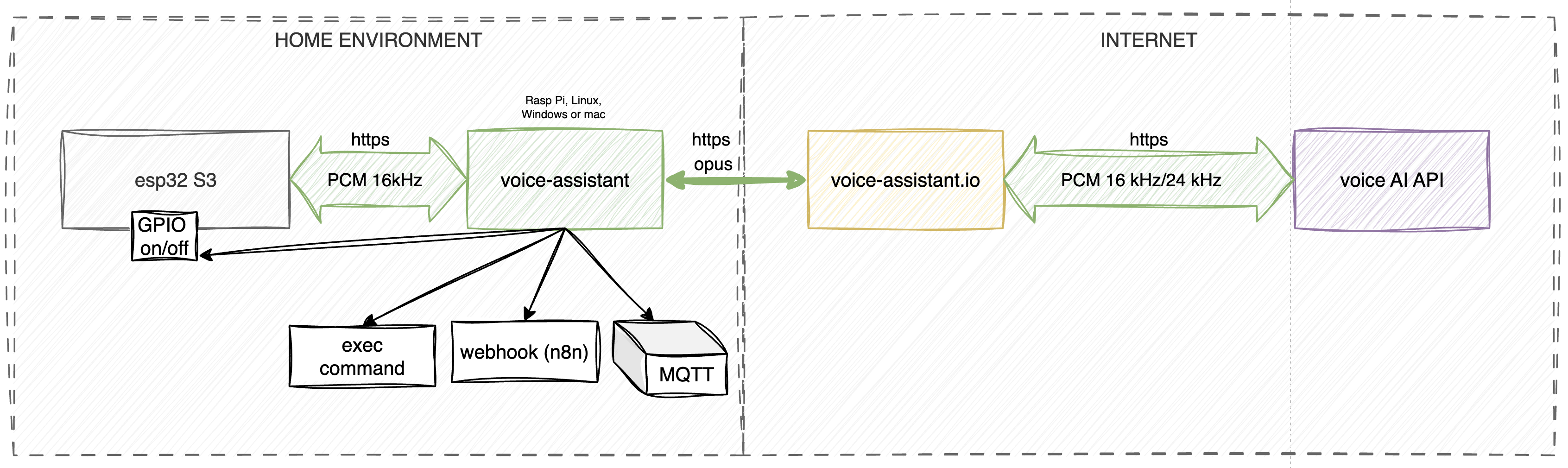
The system is built on a three-component architecture: Voice Input, Processor, and Proxy.
- Voice Input: This module handles the raw audio capture and takes care of the front-end heavy lifting—things like preliminary noise filtering and wake word detection.
- Processor: This is the brains of the operation. It's the actual voice assistant running entirely locally on your machine to execute all your custom functions. It’s also highly versatile: you can feed it audio files to play on a specific speaker, or have it read out text messages using the specific TTS (Text-to-Speech) model assigned to that speaker. Plus, it compresses the outgoing audio stream on the fly to keep bandwidth consumption down.
- Proxy: The proxy handles the decompression of the audio stream, takes care of billing, and acts as the bridge—routing voice data and function execution requests back and forth between your local setup and the AI model.
The proxy side also hosts a neat user dashboard and a built-in function editor. It automatically syncs with your local voice assistant, meaning any tweaks you make in the web control panel are instantly picked up by your device in real time.
Voice Input
This module was designed for hassle-free assembly using readily available, off-the-shelf DIY components.
Core Hardware:
-
Controller: ESP32-S3 (Dev board: ESP32-S3-DevKitC-1 N16R8)
-
Audio Output: External I2S amplifier and speaker (MAX98357A)
-
Audio Input: I2S microphone (INMP441)
To save you from the headache of messy point-to-point wiring, the main repository includes Gerber files for a custom PCB. You can easily get this fabricated at JLCPCB or any similar service, giving you a clean, factory-quality build right out of the box.
Note: The voice input currently operates in half-duplex mode due to hardware constraints. Read a detailed breakdown of these limitations here.
The Processor (voice-assistant)
The Processor acts as the brain and central orchestrator of the system. It manages the two-way communication between the hardware edge devices (Voice Input), the function execution logic, and the cloud proxy server.
Key Features:
-
Stream Management: Captures incoming audio data from the controllers, routes it to the AI model via the proxy, and streams the synthesized response back to the end device.
-
Function Execution (Function Set): Processes the model's requests to trigger your custom automations and scenarios (e.g., MQTT payloads, Webhooks, or local scripts).
-
Device Management: Enables remote volume control for the speakers and provides real-time status monitoring of the connected ESP32 boards.
-
Local API: The agent exposes an HTTP/REST interface, making third-party integrations a breeze. Through the API, you can:
- Send arbitrary audio files to be played back on a specific speaker.
- Pass raw text to be synthesized into speech (TTS) using your chosen model's voice.
Proxy Server (voice-assistant.io)
The proxy server serves two critical functions: traffic optimization and access management for the machine learning models.
1. Optimization and Architecture While the project was originally envisioned as entirely standalone, integrating modern LLMs required us to introduce an intermediate node. The proxy handles voice traffic compression (down to 70–80 kbps), significantly easing the bandwidth load on the user's end. Crucially, it also ensures reliable Voice Activity Detection (VAD) before any data is sent to the model. This keeps ambient mic noise from bleeding into the LLM, which drastically cuts down on wasted tokens.
2. Models and Billing: Why isn't this free? Testing the waters with Google AI Studio's free-tier keys quickly highlighted a few dealbreakers for a production setup:
- Privacy: Data from the free tier is actively used to train their models.
- Instability: Model names and their availability are a moving target, forcing constant reconfiguration.
- Quality: The free endpoints are prone to latency spikes and offer zero uptime guarantees.
To lock in stability—specifically, reliable access to Enterprise-grade models featuring web search and deterministic behavior—we built a custom billing system. We took Google's notoriously complex pricing grid (24+ SKUs tracking input/output tokens, function calls, you name it) and boiled it down to one straightforward metric: seconds of model usage.
Operating Modes The system is designed to be flexible, offering two distinct paths for the user:
-
DEV Mode: Powered by the free Google AI Studio. You bring your own API keys, set up your environment variables, and accept the trade-offs of Google's privacy policy. (Note: Traffic compression and pre-model VAD are disabled in this mode).
-
PROD Mode: Connects to stable enterprise APIs, billed strictly at cost via the balance in your personal dashboard. This route guarantees predictable latency, protects your data, and keeps your requests to the model completely anonymous.
The user dashboard exists simply to let you manage your balance and access tokens. Every cent goes directly toward covering the raw API and hosting costs for the project.